> ## Documentation Index
> Fetch the complete documentation index at: https://langchain-5e9cc07a-preview-eugene-1763577327-bfe51c2.mintlify.site/llms.txt
> Use this file to discover all available pages before exploring further.
# Set up Agent Auth (Beta)
> Enable secure access from agents to any system using OAuth 2.0 credentials with Agent Auth.
Agent Auth is in **Beta** and under active development. To provide feedback or use this feature, reach out to the [LangChain team](https://forum.langchain.com/c/help/langsmith/).
## Installation
Install the Agent Auth client library from PyPI:
```bash pip theme={null}
pip install langchain-auth
```
```bash uv theme={null}
uv add langchain-auth
```
## Quickstart
### 1. Initialize the client
```python theme={null}
from langchain_auth import Client
client = Client(api_key="your-langsmith-api-key")
```
### 2. Set up OAuth providers
Before agents can authenticate, you need to configure an OAuth provider using the following process:
1. Select a unique identifier for your OAuth provider to use in LangChain's platform (e.g., "github-local-dev", "google-workspace-prod").
2. Go to your OAuth provider's developer console and create a new OAuth application.
3. Set LangChain's API as an available callback URL using this structure:
```
https://api.host.langchain.com/v2/auth/callback/{provider_id}
```
For example, if your provider\_id is "github-local-dev", use:
```
https://api.host.langchain.com/v2/auth/callback/github-local-dev
```
4. Use `client.create_oauth_provider()` with the credentials from your OAuth app:
```python theme={null}
new_provider = await client.create_oauth_provider(
provider_id="{provider_id}", # Provide any unique ID. Not formally tied to the provider.
name="{provider_display_name}", # Provide any display name
client_id="{your_client_id}",
client_secret="{your_client_secret}",
auth_url="{auth_url_of_your_provider}",
token_url="{token_url_of_your_provider}",
)
```
### 3. Authenticate from an agent
The client `authenticate()` API is used to get OAuth tokens from pre-configured providers. On the first call, it takes the caller through an OAuth 2.0 auth flow.
#### In LangGraph context
By default, tokens are scoped to the calling agent using the Assistant ID parameter.
```python theme={null}
auth_result = await client.authenticate(
provider="{provider_id}",
scopes=["scopeA"],
user_id="your_user_id" # Any unique identifier to scope this token to the human caller
)
# Or if you'd like a token that can be used by any agent, set agent_scoped=False
auth_result = await client.authenticate(
provider="{provider_id}",
scopes=["scopeA"],
user_id="your_user_id",
agent_scoped=False
)
```
During execution, if authentication is required, the SDK will throw an [interrupt](https://langchain-ai.github.io/langgraph/how-tos/human_in_the_loop/add-human-in-the-loop/#pause-using-interrupt). The agent execution pauses and presents the OAuth URL to the user:
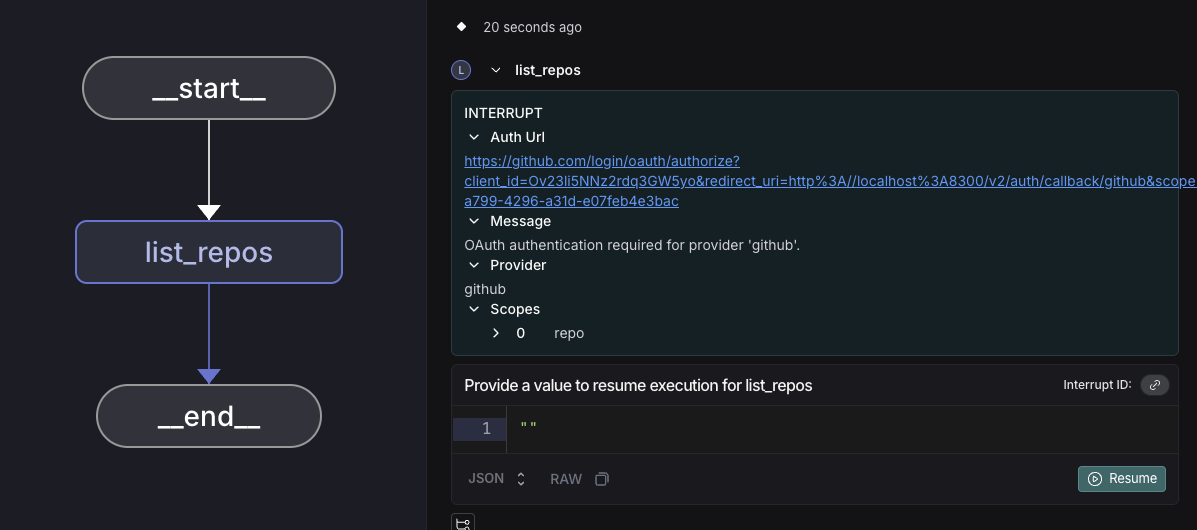 After the user completes OAuth authentication and we receive the callback from the provider, they will see the auth success page.
 The agent then resumes execution from the point it left off at, and the token can be used for any API calls. We store and refresh OAuth tokens so that future uses of the service by either the user or agent do not require an OAuth flow.
```python theme={null}
token = auth_result.token
```
#### Outside LangGraph context
Provide the `auth_url` to the user for out-of-band OAuth flows.
```python theme={null}
# Default: user-scoped token (works for any agent under this user)
auth_result = await client.authenticate(
provider="{provider_id}",
scopes=["scopeA"],
user_id="your_user_id"
)
if auth_result.needs_auth:
print(f"Complete OAuth at: {auth_result.auth_url}")
# Wait for completion
completed_auth = await client.wait_for_completion(auth_result.auth_id)
token = completed_auth.token
else:
token = auth_result.token
```
***
[Edit the source of this page on GitHub.](https://github.com/langchain-ai/docs/edit/main/src/langsmith/agent-auth.mdx)
[Connect these docs programmatically](/use-these-docs) to Claude, VSCode, and more via MCP for real-time answers.
The agent then resumes execution from the point it left off at, and the token can be used for any API calls. We store and refresh OAuth tokens so that future uses of the service by either the user or agent do not require an OAuth flow.
```python theme={null}
token = auth_result.token
```
#### Outside LangGraph context
Provide the `auth_url` to the user for out-of-band OAuth flows.
```python theme={null}
# Default: user-scoped token (works for any agent under this user)
auth_result = await client.authenticate(
provider="{provider_id}",
scopes=["scopeA"],
user_id="your_user_id"
)
if auth_result.needs_auth:
print(f"Complete OAuth at: {auth_result.auth_url}")
# Wait for completion
completed_auth = await client.wait_for_completion(auth_result.auth_id)
token = completed_auth.token
else:
token = auth_result.token
```
***
[Edit the source of this page on GitHub.](https://github.com/langchain-ai/docs/edit/main/src/langsmith/agent-auth.mdx)
[Connect these docs programmatically](/use-these-docs) to Claude, VSCode, and more via MCP for real-time answers.